
QR code for restaurant menu setups let a diner scan a code at the table and pull up the menu, order form, or feedback survey directly on their phone, with the goal of cutting print costs and updating dishes without reprinting a single page. Restaurants need something a plain business-card QR code doesn't: menus that change weekly, codes that survive spills and glare, and a system simple enough for a new hire on their first shift to manage.
- Dynamic QR codes let restaurants change menu prices or specials without reprinting table cards in 2026.
- Static QR codes are free but the destination link is permanent once printed — risky for a menu that changes.
- QRCodeStack lets a restaurant edit the linked page and track scans by table without generating a new code.
- Print codes at least 2x2 inches and test them under dim dinner lighting before rolling out to every table.
Why QR code menus matter for restaurants
A printed menu locks in every price and every dish the day it goes to the printer. A restaurant running a seasonal menu, weekend specials, or a happy hour list needs a way to change what's on the page without touching the paper on the table.
QR menus solve a second problem: staffing. A server can't answer "is the fish still on" for forty tables during a Friday rush, but a menu page that updates in real time can. Restaurants building a qr code for restaurant menu setup in 2026 typically use one code per table or section rather than one code for the whole room, because that's the only way to know which tables actually scan and when.
Build a mobile-first menu page, not a PDF
Most restaurants start by uploading the print menu as a PDF and calling it done. That's the wrong move — PDFs load slowly on restaurant wifi and force diners to pinch and zoom through a scanned image instead of reading text.
- Break the menu into single-column sections by course, not by original page layout
- Keep the file small enough to load on weak wifi or a phone with a spotty signal
- Use real text for dish names and prices, not a scanned image of the old menu
- Add photos only for signature dishes, not every line item
- Put allergens and dietary tags next to the dish, not buried in a separate PDF
Choose a QR code type that matches how often your menu changes
Free generators produce static codes, which are fine for a menu that never changes but force a full reprint the moment a price or dish changes. For a menu that shifts by season or by week, a dynamic QR code — the kind built on QRCodeStack — keeps the same printed code while the linked page updates behind it.
- Static QR codes: free and unlimited, but the destination is permanent once printed
- Dynamic QR codes: the printed code stays the same while you swap the linked page
- Test a batch of ten codes before ordering a full run of table cards
- Confirm the link isn't set to expire before it reaches every table
- Check the destination page loads in under two seconds on the restaurant's own wifi
Print and place codes so they survive a dinner shift
- Print at a minimum of 2x2 inches so a phone can scan it from arm's length at the table
- Laminate or seal table cards — spills and grease ruin unsealed paper fast
- Avoid glossy finishes near overhead lights; glare blocks the camera from reading the code
- Stand codes upright on a table tent rather than flat under a plate or napkin
- Test every code under the restaurant's actual dinner lighting, not office lighting
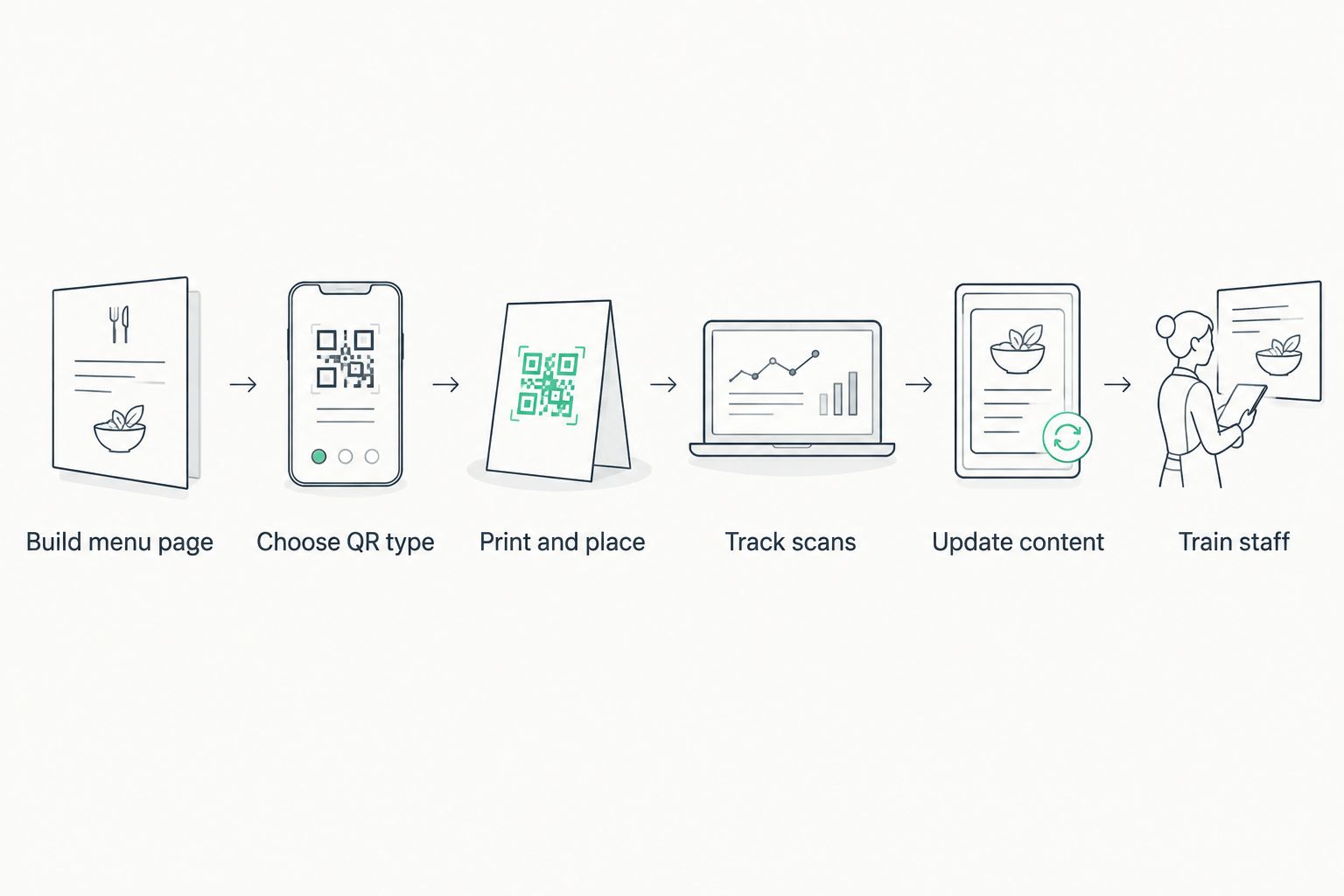
Track scans by table, time, and day
Counting scans is what turns a QR menu from a novelty into a tool. Without per-table tracking, a restaurant is guessing at what's working.
- Assign a separate code per table or per section, not one code for the whole dining room
- Watch scan volume by hour to see which shift needs more staff near the door
- Compare weekday scans to weekend scans before changing table card placement
- Flag any table code with zero scans in a week — it may be damaged or hidden
- Use scan data, not guesswork, when deciding which table tents to reprint first
Update menu content without reprinting anything
- Swap the linked page behind the same printed code the moment prices change
- Mark sold-out items on the live page as soon as the kitchen runs out
- Rotate seasonal specials on the same code used for the regular menu
- Keep a backup static link for the rare diner whose phone won't load the live page
- Update the page once, and every printed code in the restaurant reflects it immediately
Train staff to handle scan problems at the table
- Teach servers the phrase "scan to view the menu" instead of "we have a QR code"
- Keep two or three printed backup menus behind the host stand for phones that won't cooperate
- Show staff how to spot a smudged or peeling code before a shift starts
- Explain the difference between a slow phone camera and an actually broken code
- Post one instruction line under the code: "point camera, don't tap the screen"
Menu QR code options for restaurants in 2026
| Option | Best for | Key limitation |
|---|---|---|
| Free static QR generator | A one-time menu that never changes | Code must be reprinted for any edit |
| Dynamic QR platform (QRCodeStack) | Restaurants updating prices, specials, or sold-out items often | Needs an active account to keep the linked page live |
| PDF-only menu link | Restaurants with no design budget | Slow load times, hard to read on small screens |
| POS-integrated ordering QR | Restaurants moving to self-order at the table | Locks the restaurant into one POS vendor's system |
A restaurant running specials weekly should default to a dynamic QR code, not a static one — the print cost of reprinting table cards every time a price changes adds up faster than the code itself.
“If a code takes longer than two seconds to scan under dinner lighting, the design is the problem, not the diner's phone.”
Common mistakes restaurants make with QR code menus
- Printing a static code into laminated table tents, then reprinting the whole batch the next time a price changes.
- Uploading the print PDF menu as-is instead of building a page a diner can read one-handed on a phone.
- Placing one code at the entrance only, leaving seated tables with no way to reload the menu mid-meal.
- Skipping scan tracking, so no one knows which table cards get used and which sit ignored.
- Using thin, light-gray code designs that fail to scan under dim dinner lighting.
Set up a dynamic QR menu
Create a code once, then edit the linked menu page anytime.
FAQ
What's the best QR code for a restaurant menu in 2026?
A dynamic QR code is the best choice for most restaurants in 2026 because it lets the linked menu page change without reprinting the code. A static code only makes sense for a menu that will never change.
Is a dynamic QR code better than a static one for restaurants?
Yes, for any restaurant that changes prices or specials more than once a year. A static code locks in the destination link permanently, while a dynamic code keeps the same printed square while the content behind it updates.
How big should a QR code be on a restaurant table?
Print the code at least 2x2 inches so a phone can scan it comfortably from a normal seated distance. Smaller codes force diners to lean in or fail to scan under dim lighting.
Can a QR code menu replace printed menus completely?
It can, but most restaurants keep two or three backup printed menus at the host stand for diners whose phones won't load the page. A total switch works best once the live menu page has been tested across different phone models.
Do QR code menus work without wifi in the restaurant?
Yes, because the diner's phone uses its own mobile data to load the page, not the restaurant's wifi. The menu page still needs to be lightweight so it loads fast on a weak mobile signal.
Why do some restaurant QR codes fail to scan?
The most common causes are glare from glossy lamination, codes printed too small, and thin or low-contrast code designs. Testing every code under the restaurant's actual dinner lighting before rollout catches most of these issues.
Can one QR code track which table it's scanned from?
Only if each table or section gets its own separate code rather than one shared code for the whole restaurant. Assigning unique codes per table is what makes scan data useful for staffing and layout decisions.
How often should a restaurant update its QR menu page?
Update it the moment a price, dish, or availability changes, since the whole point of a dynamic code is skipping the reprint. Restaurants running weekly specials typically update the linked page every week without touching the printed code.
One last thing
The restaurants that get the most out of QR menus in 2026 aren't the ones with the fanciest landing page — they're the ones that track scans per table and actually act on the data, pulling a dead code off a rarely-scanned corner table instead of leaving it there for a year. That one habit, checking scan counts monthly, catches damaged codes and wasted table tents faster than any design choice does.